
1 · Install the new app on your phone
This is the app you'll be testing.
- iPhone: join via TestFlight → Join the Yellowbox beta
- Android: install the test build → Download Android build 5.0.0 (143)
2 · Find your assignment
Your assigned client organisation and testing flow are here → Open the staff assignments. Sign in / set up as that client and go through the whole flow.
3 · Send us a video of your test
Pick whichever is easier. Both end up in the same place.
Upload a screen recording, any video, or screenshots. You can do this on your phone: open this page on the phone that holds the recording, tap the button, and pick it from your camera roll.
or drag files here · up to 12 files · up to 5 GB each · a long recording is fine
How to record your phone screen (with your voice)
- iPhone: Settings → Control Centre → add Screen Recording. Then swipe down from the top-right, press and hold the record button, turn the Microphone on, and tap Start Recording. Stop from the red clock at the top. The video lands in Photos.
- Android: swipe down twice, tap Screen record, choose Record audio → Microphone, then Start. Stop from the notification. The video lands in Photos/Gallery.
- Talk out loud the whole time. The team only gets issues from what you say.
- Then come back here on that same phone and upload it. Keep this page open until it says the upload finished.
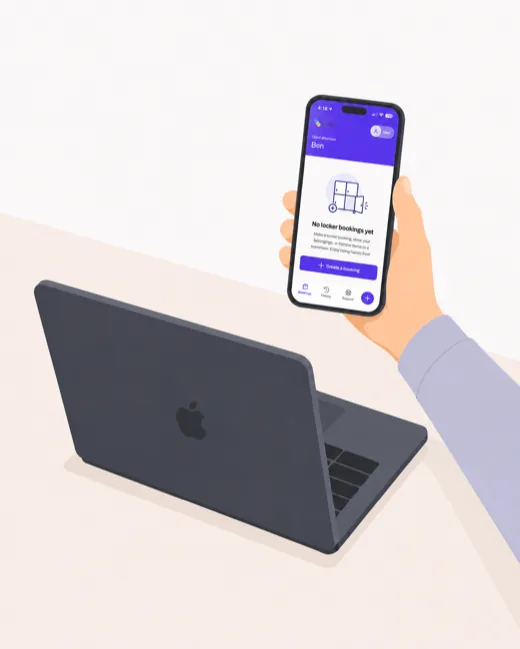
- Sit at your desk with your laptop open in front of you, and click Start camera inside the black square below. Allow camera + microphone access.
- Hold your phone up in front of the laptop's webcam, with the phone screen facing the laptop — roughly 20–30 cm away.
- Check the square preview below before you start: your phone screen should fill most of the frame and its text should be readable.
- Press the red round button in the middle of the video. It counts down from 5, then the frame shows ● REC — that is when to go through your assigned flow on the phone.
What to say while you record (important)
- Talk out loud the whole time — say what is on the phone screen at each moment so audio and video match up.
- Share your stream-of-consciousness thoughts as you tap through anything that looks off or wrong. You can always correct yourself later as you talk.
- Focus on things that are objectively wrong or incorrect. The AI uses your words and the matching video frames to file issues for the engineering and design teams — it only files what you say.
- If an error occurs, give exact details: "I tapped the Open button for my booking on locker A1 at Yellowbox HQ just after making my booking, and it said…"
- Take as long as you need — there is no time limit.
Your camera view appears here — a square frame, the same shape as the recording.
Press to start · 5-second countdown
4 · Submit
You have files from an earlier visit that never went through. The listed files are already on our server — just put your name below and send them.
Hidden. We still hold these copies — the download links keep working:
Thank you! 🎉
Your submission is in. An AI agent will process it shortly and turn what you said into tracked issues for the team.